Switchboard
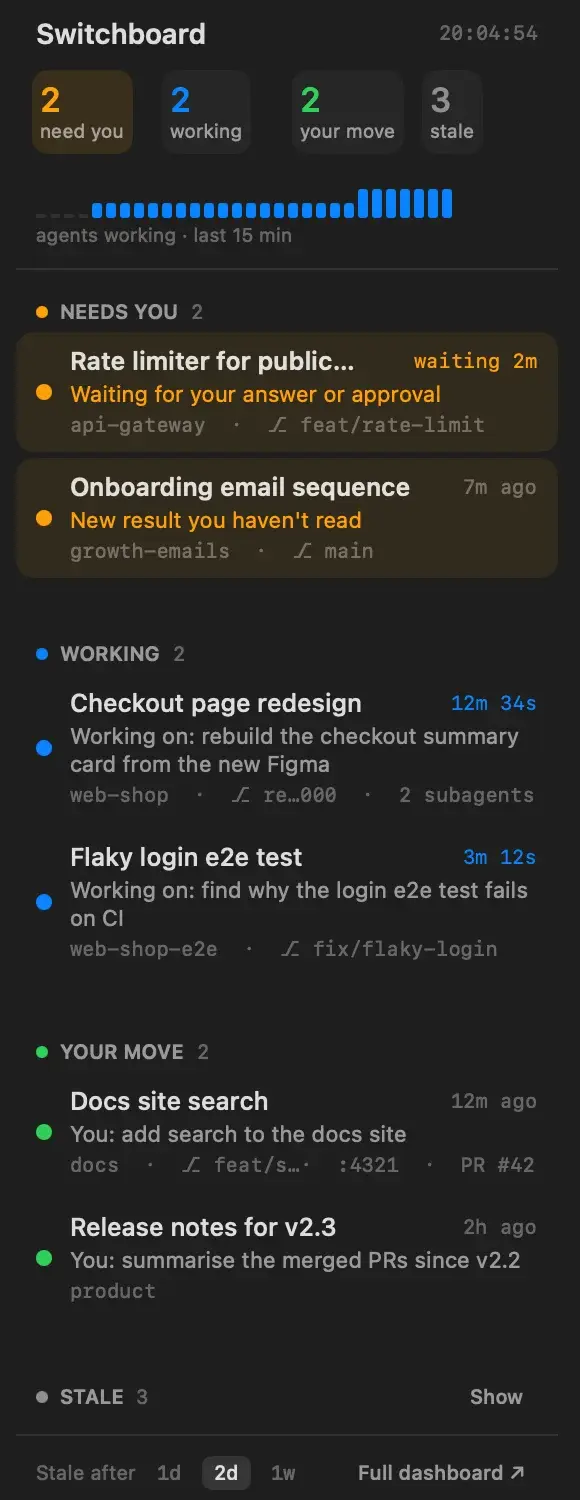
A panel for the cmux terminal that sorts the coding agents I have running into four lists: waiting on me, working, finished, and gone stale. Tapping a row opens that agent's terminal.
Open source under the MIT license.
Install the panel
The panel is one file, saved where cmux looks for sidebars. The last line opens it in cmux's right sidebar; to use it as the left sidebar, right-click the sidebar button and pick switchboard.
mkdir -p ~/.config/cmux/sidebars && \
curl -fsSL -o ~/.config/cmux/sidebars/switchboard.js \
  https://raw.githubusercontent.com/mbonete/cmux-switchboard-panel/main/switchboard.js && \
cmux right-sidebar set custom switchboardIt needs cmux with Custom Sidebars turned on, which is the default.
What it does
I run several coding agents at once in cmux, each in its own workspace. Switchboard reads cmux's live list of agents and sorts them:
- Needs you. An agent waiting for an answer or an approval, or a result I haven't read. The longest wait comes first.
- Working. Agents in the middle of a turn, with a live timer, my last prompt and how many subagents are running.
- Your move. Agents that finished and are waiting for my next message.
- Stale. No activity for longer than a threshold I pick: a day, two days or a week. Collapsed until I open it.
Each row also shows the folder, the git branch, any dev-server ports and the pull request. A strip at the top counts how many agents were working over the last 15 minutes.
The web dashboard
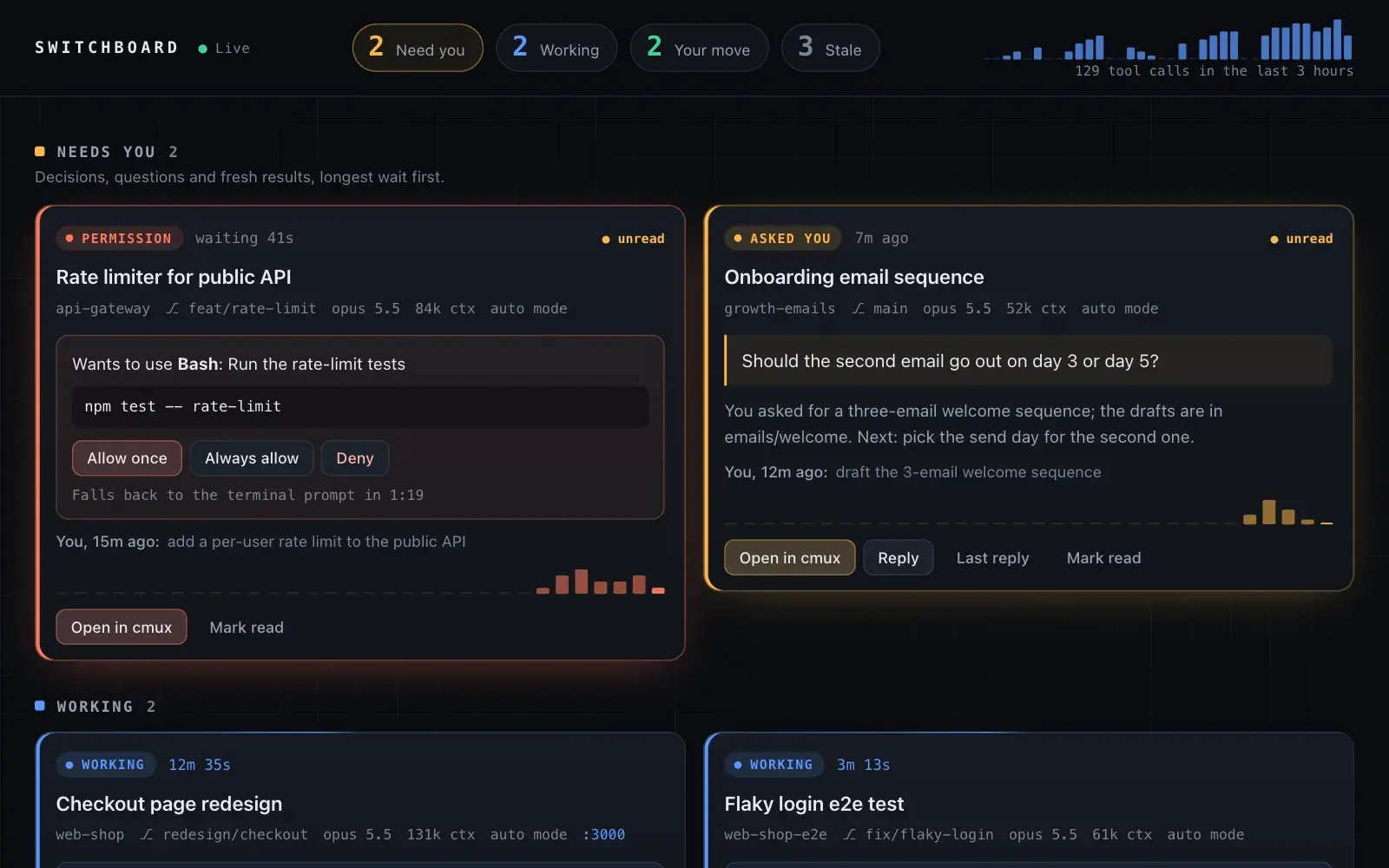
cmux gives sidebars no access to files or the network, so what needs either lives in a separate local web dashboard. It reads Claude Code's transcripts to show each agent's recap and last reply, flags a reply that ends on a question, and lets me allow a command, answer a question or send a reply from the page.
I checked each of those end to end against a throwaway Claude Code session: the command ran, the reply arrived and the answer reached the agent.
Decisions worth a look
- The panel needs no server. It reads the list of agents cmux already keeps, so nothing has to run alongside it. I've tested it with Claude Code.
- A reply only goes into an empty prompt. The dashboard types a reply into the agent's terminal and presses Enter. Just before that, the server checks again that the agent is idle and its prompt box is empty, so a reply can't land in the middle of a turn or mix with a half-written draft.
- Answers go through cmux. Allowing a command or answering a question uses cmux's Feed, which holds the agent's request for about two minutes before the agent falls back to its own prompt. The card counts that window down, then says to answer in the terminal.
- Stale counts from the last prompt. cmux re-stamps an agent's last-activity time whenever it restores sessions after a restart, so Switchboard counts from the last prompt and the transcript, which a restart leaves alone.
- The dashboard stays on the machine. It listens on 127.0.0.1, refuses requests addressed to any other host name, and every action needs a token created at start-up that only the page has, so another website open in the browser can't trigger one.
Stack
Panel: JavaScript on cmux's sidebar runtime. Dashboard: Node.js with no dependencies, Server-Sent Events, the cmux CLI and socket API, and Claude Code's JSONL transcripts.